

Autonomous inbound is becoming a critical capability for manufacturing organizations looking to eliminate manual data entry and improve inbound efficiency.
Many operations teams still rely on supplier documents in multiple formats, requiring manual data transfer before updating ERP systems (Dynamics 365, SAP,…). This creates bottlenecks, increases errors, and delays downstream production and delivery processes.
At Yokogawa Votiva Solutions, we build AI agents that automate inbound data processing — from supplier files to ERP execution — enabling faster, more accurate, and scalable operations.
The Challenge: Too Many Supplier Formats, Too Much Manual Work
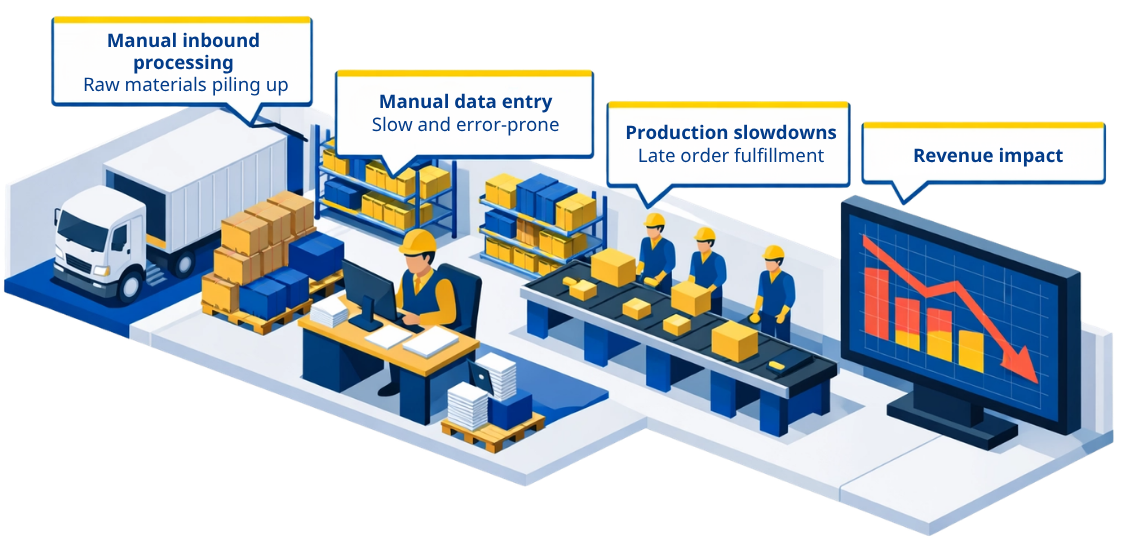
In many inbound warehouse processes, supplier data arrives in PDFs, Excel files, CSVs, or other inconsistent document formats. Operations teams then have to extract information manually and enter it into a ledger sheet or ERP-related file for inventory control. This creates three common business problems:
- Supplier files come in multiple formats (PDF, Excel, CSV)
- Staff manually extract and re-enter data
- Inbound processing is delayed
- Item-level tracking is limited
When warehouse data starts with disconnected files and repetitive copy-paste work, the result is often delayed receiving, inconsistent records, and weak traceability. The solution in your file is built to remove that bottleneck at the source.
Autonomous Inbound Receiving for Warehouse Arrivals
This solution focuses on one critical process: inbound receiving.
Instead of manually preparing data after goods arrive, AI prepares and executes inbound operations in advance — ensuring your warehouse is ready before the shipment reaches the dock.
By combining data preparation and system execution, inbound operations can move from reactive processing to a more proactive, controlled workflow.
From Supplier Files to Clean, Validated Data
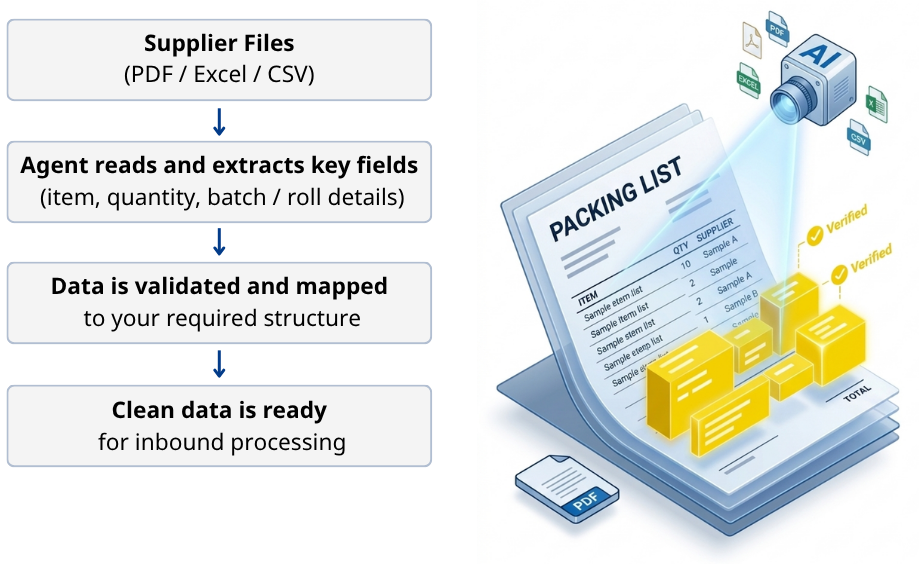
The process begins with supplier documents. AI automatically reads supplier packing lists in multiple formats and extracts key information such as item details, quantities, and batch or roll identifiers. This data is then validated and mapped into a standardized structure that can be used consistently across systems.
To ensure reliability, validation steps can be applied before data is finalized — helping teams maintain accuracy while reducing manual effort.
This stage transforms unstructured supplier files into clean, ERP-ready data.
How it works
- Reads supplier packing lists (PDF, Excel, CSV)
- Extracts key fields such as item, quantity, and batch details
- Validates and maps data into a standardized structure
- Prepares clean data ready for ERP integration
Key benefits
- Reduce manual data entry from supplier documents
- Standardize inbound data from multiple formats
- Improve data accuracy before it reaches ERP
- Build a trusted data foundation for automation
From Validated Data to Autonomous Warehouse Execution
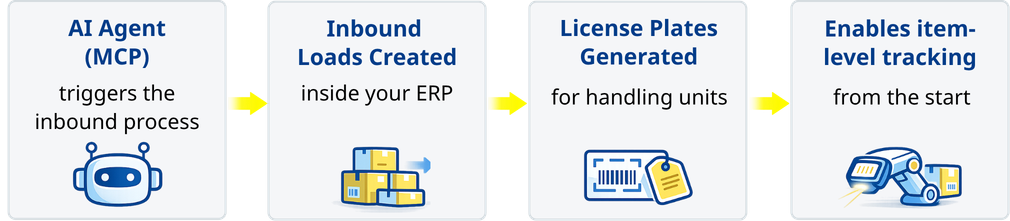
Once data is clean and structured, the system can act on it. An autonomous AI agent operates directly within Dynamics 365 F&O to execute inbound warehouse processes. It uses the validated data to create inbound loads, generate license plates, and enable item-level tracking before goods physically arrive.
This allows inbound operations to be prepared in advance — instead of waiting for manual processing at the time of receiving.
How it works
- AI agent triggers inbound processes in Dynamics 365 F&O
- Automatically creates inbound loads
- Generates license plates for handling units
- Enables individual item-level tracking
Business outcomes
- Create inbound records automatically
- Generate license plates for warehouse operations
- Improve item-level visibility and traceability
- Prepare receiving before goods arrive
- Reduce manual workload in warehouse processes
Powered by Microsoft Technologies
The solution leverages Microsoft technologies across document processing, automation, validation, and ERP execution.
Key components include Azure Document Intelligence, Power Automate, Power Apps, Copilot Studio, Dynamics 365 Finance & Operations, and the D365FO MCP server.
Together, this architecture enables a seamless flow:
- Capture supplier documents
- Extract and standardize data
- Validate exceptions
- Execute inbound operations automatically
- Keep everything connected within Dynamics 365 F&O
Governance and Security Considerations
Security is a critical part of the solution design.
Role-based access control ensures that only authorized users can view or approve sensitive data. All data processing remains within the Microsoft tenant boundary, supporting enterprise-level security and compliance requirements.
This allows organizations to adopt automation while maintaining full control over their data.
From Manual Input to Autonomous Warehouse Readiness
Inbound operations often begin with manual work — but they do not have to stay that way.
By transforming supplier documents into validated data and enabling autonomous execution inside Dynamics 365 F&O, businesses can move toward a more efficient, accurate, and scalable inbound process.
The result is a warehouse that is no longer reacting to incoming shipments, but prepared for them.
Ready to Transform Your Inbound Operations?
Yokogawa Votiva Solutions combines Microsoft ecosystem expertise with ISO-certified processes to ensure accuracy, control, and reliability across every step — from data validation to warehouse execution.
Talk to Yokogawa Votiva Solutions to see how autonomous inbound execution can work in your operation.